

Backlit Bluetooth Ergonomic Keyboard, ProtoArc EK01 Plus Full Size Wireless Split Keyboard with Dual Bluetooth and USB, Cushioned Wrist Rest, Rechargeable for Windows/Mac/Android, Grey Black
Original price was: $99.99.$74.99Current price is: $74.99.
Related Products




Product description
ProtoArc Backlit Full Size Bluetooth Ergonomic Keyboard
The video showcases the product in use.The video guides you through product setup.The video compares multiple products.The video shows the product being unpacked. Wireless Ergonomic Keyboard
Note: Only EK01 Plus backlit Bluetooth ergonomic keyboard (mouse not included).
and When you first use it, it may take some time to adapt to the layout, which may cause inconvenience, but our ergonomic design helps relieve the muscle pressure on your wrists and forearms.
 Full Size with Cushioned Wrist Rest
Cushioned wrist rest provides 54% support to make typing effortless and comfortable
 Ergonomic Comfort Design
Curved split key frames improve typing posture, reducing muscle strain on your wrists and forearms
 Pillowed Wrist Rest
3 layers of comfort: soft synthetic leather, high-density support foam and comfortable memory foam
 Three Different Tilt Angles
Ensures comfort and relaxation for your wrists whether you are sitting or standing
1 Productivity & Comfort
2 Ergonomic Design
3 More Wrist Support
4 Adjustable Tilt Feet

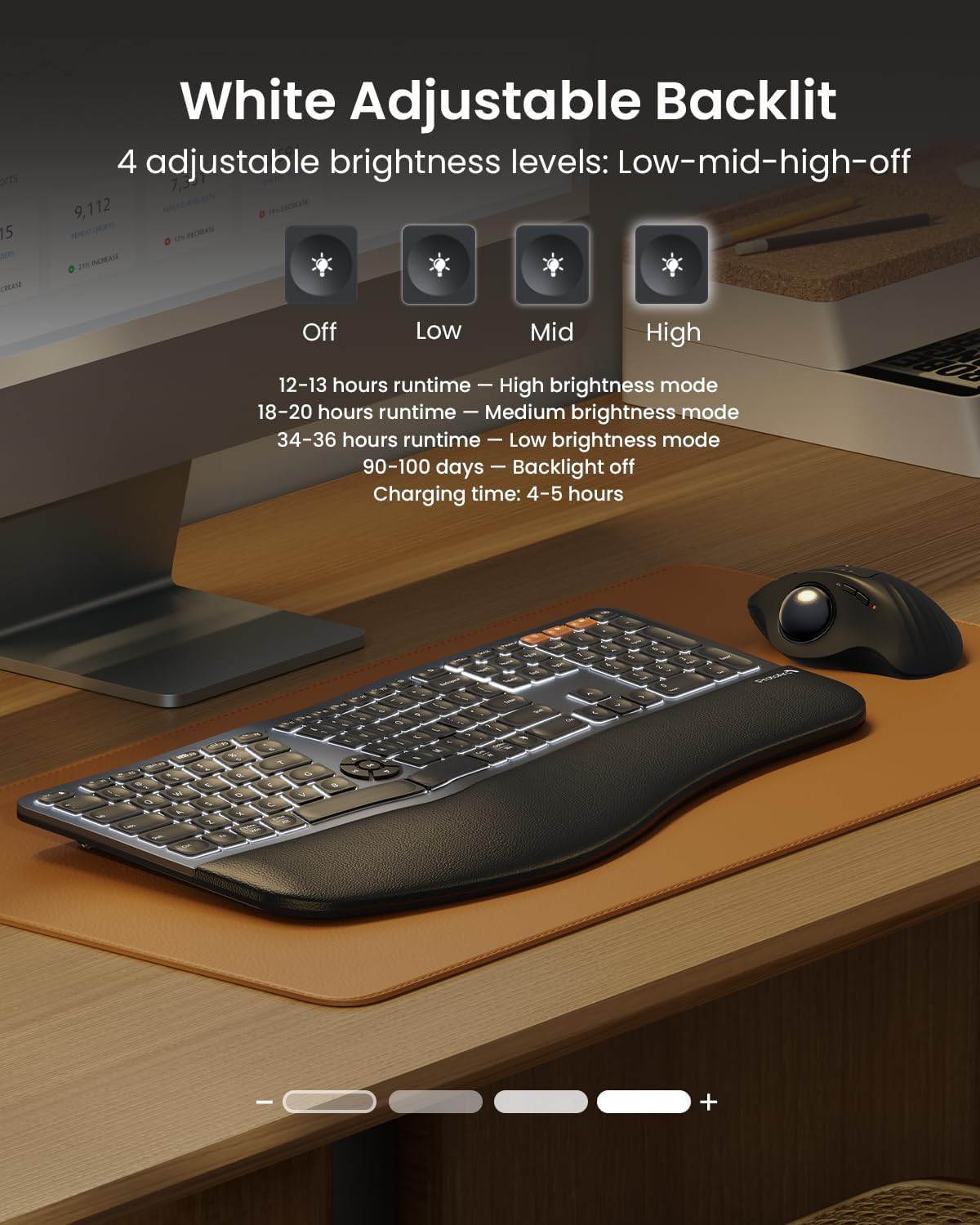
3 brightness levels (low/mid/high)
Upgraded 2000mAh rechargeable battery
Eye-friendly design


1 Soft White Backlight
2 Connect up to 3 devices
3 Multi-Color Ergo Keyboard
Comfort and Efficiency at Every Keystroke with Full Size Backlit Ergo Keyboard


Upgraded Rechargeable Battery: Compared to the EKM01 Plus set (500mAh), the EK01 Plus keyboard features a 2000mAh battery, delivering 4 times the capacity
By default, F1-F12 are multimedia function keys. it need to press Esc+Fn to turn off to switch to traditional key functions
Wireless Ergonomic Combo is Designed for Premium Comfort and Productivity
 Meet Ergo Series with EM11 Pro Ergonomic Mouse
Choose the EM11 Pro for browser-based button customization, a time-saving side scroll wheel, a 58° ergonomic design that reduces wrist fatigue by 90%, and seamless switching between 3 devices
 Meet Ergo Series with EM11 NL Ergonomic Mouse
Wireless combo is designed for premium typing comfort and productivity
 Pair with Ergonomic Mouse Pad with Wrist Rest
ProtoArc ergonomic mouse pad features an 8-degree tilt to provides stable support for your wrist and palm, effectively alleviating fatigue from prolonged use, while also helping to improve discomfort
 Pair with MP10 Leather Office Desk Pad Protector
ProtoArc MP10 Leather Office Desk Pad Protector features high-quality vegan PU leather, it shields your desk from scratches caused by hard surfaces like phones and watches
 Complete Your Workspace with ProtoArc EM15 Mouse
The mouse works flawlessly and has three connection options via USB-A, USB-C and Bluetooth. The mouse is lightweight, with battery life lasting a month or two between charges

Note: All keys of the keyboard are not programmable and do not support wired mode
Some keyboard keys do not work / Keyboard keys have typing delay / Keyboard keys repeat typing:
1.Make sure the keyboard is fully charged;
2.Turn off Bluetooth on your computer and then turn it back on
3.Recommended to be compatible with PC devices produced after 2015;
The keyboard cannot connect to your device?
1.Ensure that the keyboard is fully charged.
2.Confirm that the keyboard is in the correct mode.
3.Delete the keyboard’s Bluetooth pairing from your device’s Bluetooth listing.
4.Repair the keyboard with your device.
How to Use Multimedia or F1-F12 function?
FN-Lock key makes it easy to switch between F-keys and Media keys by pressing Fn+Esc. The Bluetooth keyboard comes preconfigured with multimedia functions. Press Fn+ESC key to activate the FN functions, you can perform F1 ~ F12 functions
The brightness control keys are non-functional when using the mac mini m4 with an external mac display?
The brightness control keys of the keyboard are non-functional when used with mac mini m4 and its external display. This issue is expected to be resolved in a future firmware update.
Multimedia keys and Option and Command key functions, combination keys cannot be used normally?
In 2.4G mode, the keyboard is not compatible with the Mac OS system, resulting in some function keys not being able to be used normally. You can try switching to Bluetooth mode
ProtoArc Wireless Ergonomic Keyboard
Add to Cart
Customer Reviews
4.2 out of 5 stars 1,362
4.0 out of 5 stars 117
4.3 out of 5 stars 101
4.6 out of 5 stars 115
Price
$74.99$74.99
$69.99$69.99
$49.99$49.99
$25.99$25.99
Backlight
✔
✘
✘
✘
Keyboard Layout
Full Size (117 Keys)
Compact Size with Number Pad
Compact Size (80 Keys)
34 Keys
Keyboard Frame
Curved Split Design
Curved Split Design
Curved Split Design
/
Connection Type
2.4G + Dual Bluetooth
2.4G + Dual Bluetooth
2.4G + Dual Bluetooth
2.4G + Bluetooth
USB C Recharge
✔
✔
✔
✔
Color
Black & Gray
Black & Gray
Black & Gray
Black
Full-Size Ergonomic Design: Say goodbye to discomfort with the ProtoArc Ergonomic Keyboard. Unlike standard keyboards, our full-size layout features a curved, split-keyframe design that reduces muscle strain on your wrists and forearms while promoting proper posture. The scooped keys are crafted to fit your fingertips perfectly, making typing effortless and natural
Adjustable Backlighting: The ergonomic keyboard features soft white LED backlighting with three adjustable brightness levels (low, mid, high). Whether you’re typing in a dimly lit room or a bright office, you can set the suitable brightness to reduce eye strain and stay productive
Note: The keyboard backlight adjusts based on inactivity periods to conserve power: After 1 minute: Backlight turns off (press any key to wake); After 60 minutes: Enters deep sleep mode with backlight disabled (press any key to wake the keyboard within 3 seconds, then manually turn on the backlight)
Seamless 3 Device Switching: Switch between devices effortlessly. With Bluetooth and 2.4G USB connectivity, this wireless keyboard can pair with up to three devices simultaneously. A simple key press lets you jump between your laptop, tablet, and computer. It’s compatible with Windows 8/10 or above, Mac OS X 10.12 or above, Android 4.3 or above, and Microsoft systems. (The keyboard cannot be connected via wire)
USB-C Fast Charging: The ergo keyboard is equipped with a large 2000mAh rechargeable battery, offering extended working hours—especially with the backlight turned off. Focus on your tasks without worrying about frequent charging
Cushioned Wrist Rest & Adjustable Tilt Feet: Experience comfort with our ergonomic keyboard. The curved wrist rest provides 54% more support to reduce wrist fatigue, ensuring comfortable typing for hours. With four adjustable tilt feet, you can choose the keyboard to three different angles, keeping your wrists relaxed whether you’re sitting or standing
Charging Tips: For optimal performance, charge the keyboard using a computer’s USB port or a DC 5V 1A charger. Avoid using fast chargers or high-power adapters, as they may affect the keyboard’s performance. (The buttons do not support programming)
Space Considerations: While our full-size ergonomic keyboard enhances productivity, it may occupy more desk space. Please measure check the dimensions before ordering to ensure it fits your workspace perfectly
By default, F1-F12 are multimedia function keys. it need to press Esc+Fn to turn off to switch to traditional key functions
13 reviews for Backlit Bluetooth Ergonomic Keyboard, ProtoArc EK01 Plus Full Size Wireless Split Keyboard with Dual Bluetooth and USB, Cushioned Wrist Rest, Rechargeable for Windows/Mac/Android, Grey Black
Add a review

Original price was: $99.99.$74.99Current price is: $74.99.
ChicoThorn –
Banjoey –
Adam –
Papa Tango –
Amazon Customer –
D. Orr Jr. –
Daniel Scurlock –
Harry Marsh –
Mise –
André Estevão da Cruz –
Ruben Gutierrez –
Rajalakshmi –
Luke –