
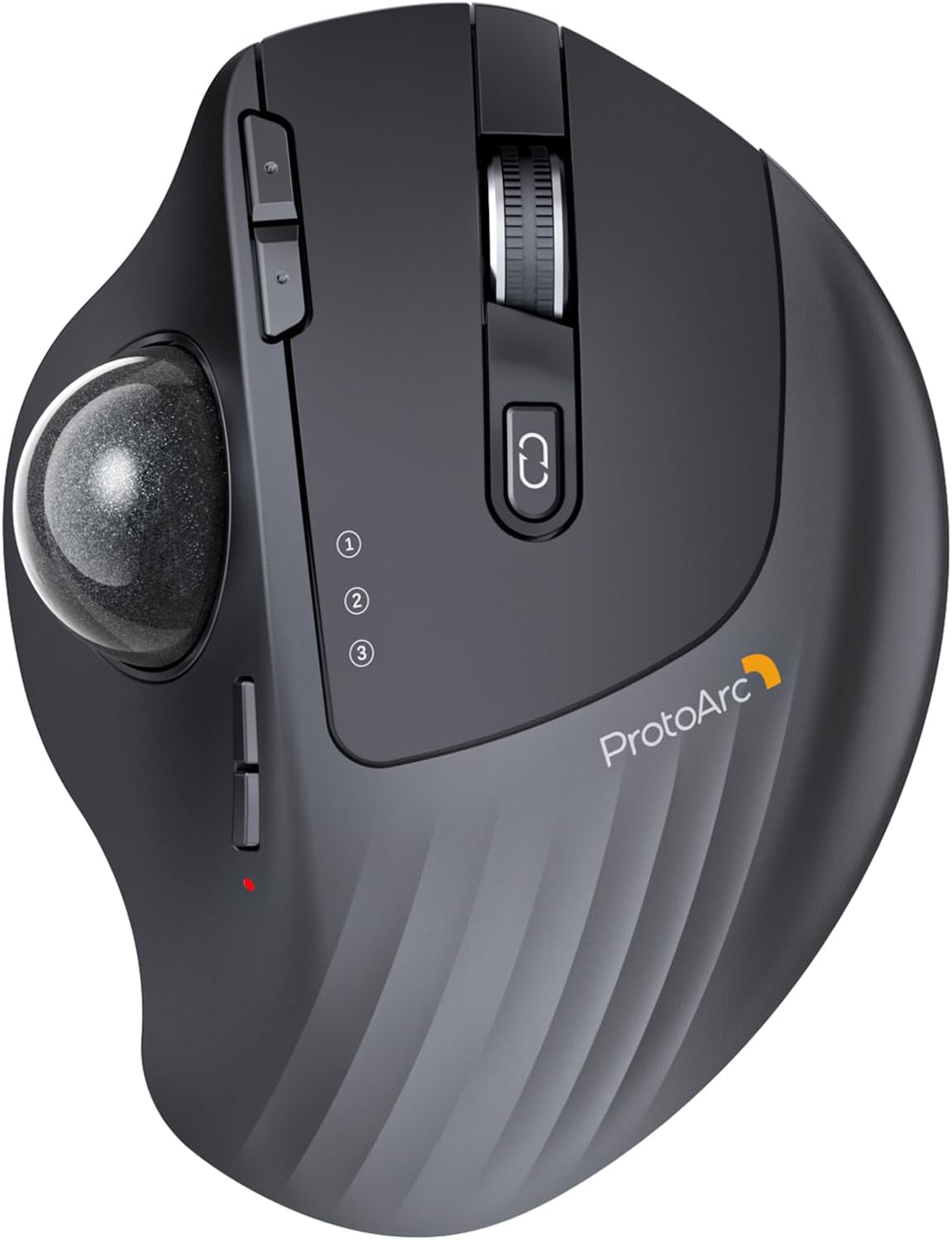
ProtoArc Wireless Trackball, EM01 NL Ergonomic Bluetooth Rollerball Thumb Mouse, Rechargeable Computer Laptop Mouse, Adjustable Angle & 3 Device Connection for PC, Mac, Windows – Gray Ball
Original price was: $44.99.$35.99Current price is: $35.99.
Related Products




Product description
ProtoArc EM01 NL Wireless Trackball Mouse
The video showcases the product in use.The video guides you through product setup.The video compares multiple products.The video shows the product being unpacked. aplus content video
 Bluetooth & 2.4G Wireless
Switch freely between Android, tablet and Mac with just one button
 900mAh Large Battery Capacity
Easily charge the mouse with the included usb c charging cable anytime anywhere

1 Multi-Device Connection
2 Rechargeable Mouse
3 Different Scenarios


1 Ergonomic Trackball Mouse
2 Adaptation Time
3 Measure Your Hand First
4 Product Features
Keep Your Trackball Rolling Smoothly
Is your trackball feeling sticky, jumpy, or less responsive? Over time, dust, oil, and dead skin cells build up inside the mechanism, causing the ball to drag or the cursor to skip. In this video, we’ll show you how to give it a proper clean. Regular maintenance restores that silky-smooth glide, ensures precise cursor control, and extends the life of your device. A few minutes of care makes all the difference!
The video showcases the product in use.The video guides you through product setup.The video compares multiple products.The video shows the product being unpacked. EM01 NL Trackball cleaning video
Warm Tips for EM01 NL Wireless Trackball Mouse
The trackball mouse offers a distinctly different feel compared to traditional mice and may require some time to get used to. For first-time users, we recommend starting at 200/400 DPI and adjusting only once you feel comfortable.This product does not support horizontal scrolling (tilt function).This product is not recommended for tasks that demand extremely fine cursor control or high precision, such as image editing or CAD design.For users with smaller hands (measured less than 17.5 cm from the base of the palm to the center), the size of this product may be too large to hold comfortably.Please note that using a USB charging cable purchased separately may not charge the device. Always use the included USB cable.All the buttons are non-programmable and the backward forward buttons are not compatible with Mac OS system.
Wireless Ergo Combo is Designed for Comfort and Productivity
 Pair with EK01 Plus Backlit Ergonomic Keyboard
Type more naturally with ProtoArc EK01 Plus. The ergo keyboard with cushioned palm rest, curved split keyframe and responsive scissor keys – Reduces wrist strain, keep your hands and shoulder relaxed
 Pair with ProtoArc EC200 Ergonomic Chair
Transform your home office into a productivity haven with our ergonomic trackball mouse and chair. Designed to provide all-day comfort
 Pair with EK04 2-in-1 Wireless Ergonomic Keyboard
ProtoArc EK04 wireless ergonomic keyboard with separate number pad provides greater flexibility for your workspace setup, greatly helps to improve your work productivity.
 Pair with EK04 Mini Wireless Ergonomic Keyboard
ProtoArc EK04 Mini compact ergonomic keyboard offers a space-saving solution to maximize workspace efficiency without sacrificing comfort and functionality.
 Pair with EK04 N Ergonomic Number Pad
ProtoArc EK04 N wireless ergonomic number pad with wrist rest can enhance work efficiency and provide typing comfort for long-term data entry work.

ProtoArc Wireless Bluetooth Mouse
Add to Cart
Add to Cart
Add to Cart
Add to Cart
Add to Cart
Add to Cart
Add to Cart
Customer Reviews
4.2 out of 5 stars 3,397
4.4 out of 5 stars 233
4.3 out of 5 stars 432
4.4 out of 5 stars 1,932
4.4 out of 5 stars 5,520
4.2 out of 5 stars 182
4.4 out of 5 stars 646
Price
$35.99$35.99
$32.99$32.99
$42.99$42.99
$29.99$29.99
$20.88$20.88
$34.99$34.99
$11.39$11.39
Connection Type
2.4G + Dual Bluetooth
2.4G + Dual Bluetooth
2.4G + Dual Bluetooth
2.4G + Dual Bluetooth
2.4G + Dual Bluetooth
2.4G + Dual Bluetooth
USB-C + 2.4G + Bluetooth
Compatibility
MacOS,iOS, iPadOS, Win,Android
MacOS,iOS, iPadOS, Win,Android
MacOS,iOS, iPadOS, Win,Android
MacOS,iOS, iPadOS, Win,Android
MacOS,iOS, iPadOS, Win,Android
MacOS,iOS, iPadOS, Win,Android
MacOS,iOS, iPadOS, Win,Android
Color
Black-Gray Ball
Black-Gray Ball
Black-Gray Ball
Black
Black
Black-Gray Ball
Black
USB-C Charging
✔
✔
✔
✔
✔
✔
✔
Mouse Type
Thumb Type
Thumb Type
Thumb Type
Thumb Type
Vertical Mouse
Index Finger Type
/
Hand Size
Great for Medium Hand
Great for Medium Hand
Great for Medium Hand
Great for Small Hand
Great for Medium Hand
Great for Medium to Large Hand
Great for Medium Hand
Adjustable Trackball Comfort: The 0-20° hinge lets you set the trackball angle to match your hand position, supporting a more natural grip through long work sessions
Thumb-Control Precision: Navigate documents and web pages by moving the thumb trackball instead of your whole arm, making it easier to work on crowded desks, couches, or beds
3-Device Wireless Control: Bluetooth and 2.4G wireless modes let you connect up to three devices and switch between PC, laptop, and tablet with one button
Rechargeable 5-DPI Tracking: The built-in rechargeable battery avoids disposable battery swaps, while 200/400/800/1200/1600 DPI levels adjust cursor speed for different tasks
Quiet Shared-Space Clicks: Quiet left and right clicks and a frosted surface support focused work in offices or home spaces; scroll wheel and side buttons are not silent
Easy Trackball Maintenance: Clean the trackball and three white rollers after extended use to help keep movement smooth, especially after startup or heavy app loading
User Reviews
Be the first to review “ProtoArc Wireless Trackball, EM01 NL Ergonomic Bluetooth Rollerball Thumb Mouse, Rechargeable Computer Laptop Mouse, Adjustable Angle & 3 Device Connection for PC, Mac, Windows – Gray Ball”

Original price was: $44.99.$35.99Current price is: $35.99.
There are no reviews yet.