
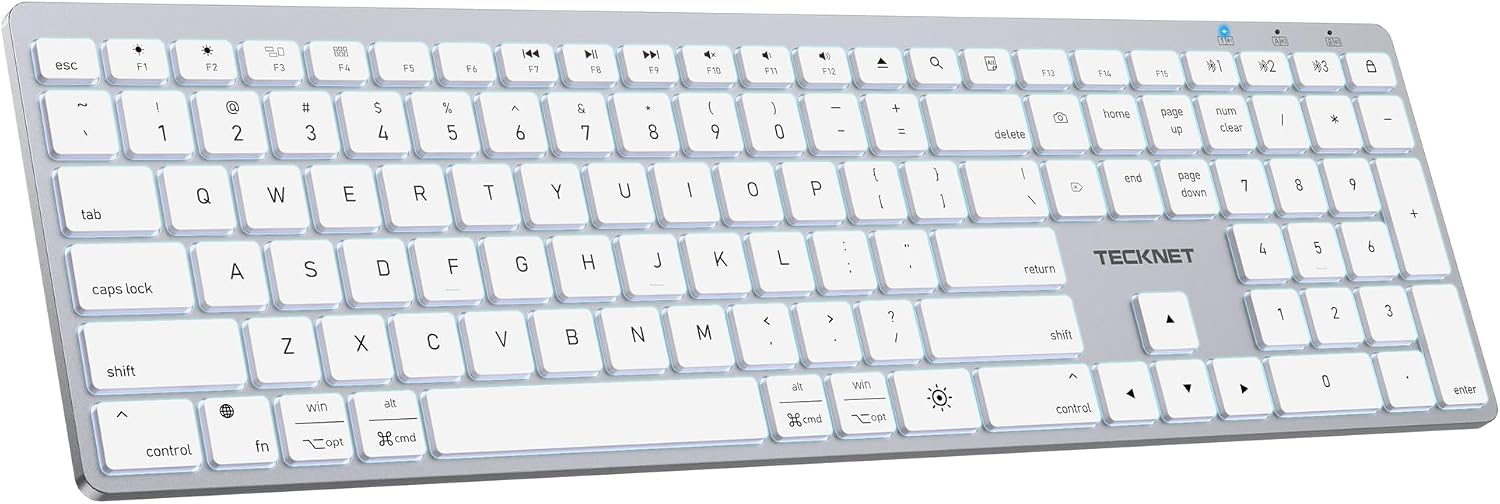
TECKNET Backlit Bluetooth Keyboard for Mac, Multi-Device Rechargeable Quiet | Compatible Apple Keyboard for MacBook Pro/Air, iMac, Up to 3 Devices, Numeric Keypad, 1600 mAh, Steel, Stable Wireless
$49.99
Related Products



Product description


The wireless keyboard is fully compatible with mac device and it is also compatible with most Windows computers, but may not be compatible with some less popular computers (such as Honor laptops).


1 Multi-Device 2 Rechargeable 1600mAh 3 Scissor Switch 4 Stable Connection


With option for Windows
Mac users directly pressing the multimedia keys; Windows users press the fn key in combination.
1 Familiar Typing Feeling
2 Ultra Slim Design
3 Layout for Mac
The video showcases the product in use.The video guides you through product setup.The video compares multiple products.The video shows the product being unpacked. 3 Adjustable white backlight
Backlight Sleep Mode: The backlight turns off automatically after 1 minute of keyboard inactivity, press any key to turn it back on.
Keyboard Sleep Mode: The keyboard enters deep sleep mode after 10 minutes of inactivity, press any key and wait 3-5 seconds to auto reconnect.
 Office Use
 Home Use
 School Use
How to Turn on the Keyboard?
1. Toggle the power switch at the bottom of the keyboard; the blue indicator light in the top-right corner will turn on.
2. If it does not light up, please charge it for 2 hours.
The video showcases the product in use.The video guides you through product setup.The video compares multiple products.The video shows the product being unpacked. How to Turn on the Keyboard?
How to Connect via Bluetooth?
1. Short press fn+BT1 → Light blinks slowly (Channel Selected).
2. Hold BT1 for 5s → Light blinks fast (Ready to Pair).
3. On your device, select “TKKB051-BT1” → Indicator turns off when paired.
Then you can use the keyboard.
The video showcases the product in use.The video guides you through product setup.The video compares multiple products.The video shows the product being unpacked. How to Connect via Bluetooth?
How to Switch Between 3 Devices?
1. Please make sure the 3 devices have been connected successfully.
2. Short press “fn + BT1 or BT2 or BT3” to switch between 3 devices. → Indicator flashes slowly for 1-3 seconds and turns off when paired.
The video showcases the product in use.The video guides you through product setup.The video compares multiple products.The video shows the product being unpacked. How to Switch Between 3 Devices?
Multimedia Keys
1. All multimedia keys are compatible with macOS(Compatible with MacBook Pro/Air, iMac, iMac Pro, Mac Mini, Mac Pro)
2. Please note: Some multimedia keys are not compatible with iPad and iPhone.
The video showcases the product in use.The video guides you through product setup.The video compares multiple products.The video shows the product being unpacked. Key functions demonstrated on macOS
THREE-LEVEL WHITE BACKLIGHT: Featuring one-key control for three levels of white backlight. The soft white backlight ensures clear key visibility in dark environments, reducing eye strain while maintaining a sleek Mac-style aesthetic.
DESIGN FOR macOS SYSTEM: Fully compatible with macOS systems and devices: MacBook Air, MacBook Pro, iMac, Mac mini, and Mac Pro. Note: It is not fully compatible with iOS/iPadOS/Windows systems.
MULTI DEVICES: Connect up to 3 devices with bluetooth, it is very suitable for both users with single or multiple wireless devices, providing a smooth and hassle-free wireless typing experience. Short press fn+BT1/BT2/BT3 to switch different devices(indicator flash slowly) and long press BT1/BT2/BT3 to connect(indicator flash quickly).
SCISSOR SWITCH & UV OIL KEYS: Adopting scissor switch structure and UV oil film keys, the full-size Mac keyboard delivers a responsive and comfortable typing experience. The UV oil film enhances key wear resistance and clarity, ensuring long-term use without fading or wear.
1600MAH RECHARGEABLE BATTERY: 3 hours to fully charge. It offers 100 days of continuous use per charge in non-backlight mode. It is recommended weekly charging when the backlight is on, ensuring long-term, hassle-free use.
ONE-KEY LOCK SCREEN & SCREENSHOT: The one-key lock screen enables quick, convenient privacy protection with an instant lock. The one-key screenshot allows easy, quick screen captures without complex combinations. An independent on/off switch prevents accidental touches when not in use.
AUTO SLEEP MODE & POWER SAVING: Backlight Sleep Mode: The backlight turns off automatically after 1 minute of keyboard inactivity, press any key to turn it back on. Keyboard Sleep Mode: The keyboard enters deep sleep mode after 10 minutes of inactivity, press any key and wait 3-5 seconds to auto reconnect.
SLIM AND ERGONOMIC DESIGN: This Bluetooth keyboard combines sleek with practical ergonomics. Its raised support legs deliver the perfect tilt angle for comfortable, fatigue-free typing. Built to last, the backplate features a robust iron + PC surface treatment, ensuring exceptional durability and a long service life.
8 reviews for TECKNET Backlit Bluetooth Keyboard for Mac, Multi-Device Rechargeable Quiet | Compatible Apple Keyboard for MacBook Pro/Air, iMac, Up to 3 Devices, Numeric Keypad, 1600 mAh, Steel, Stable Wireless
Add a review

$49.99
MikeTOrangeCounty (Fishbrain and YouTube) –
LeilaM –
Pat Nelson –
Rodeman –
Michael and Ruth Ann –
Ross –
Amazon Customer –
Serge van Neck –